

An AI agent is not a legal person, so the organisation that deploys one stays accountable for what it does with personal data. That is the core of the Privacy Commissioner's guidance on agentic AI, published on 25 August 2026. In practice it means ten engineering controls, built in before an agent goes live: a register, a scoped identity, the Rule of Two, approval gates, vetted tools, an isolated runtime, an audit trail, memory limits, measured accuracy, and a way to switch the agent off.
Your IT and data protection teams can use the list below to check any agent before it goes live.
Why the PCPD wrote guidance for agents
An agent reads files, calls tools and APIs, and acts across several systems with little supervision. A chatbot only answers. The PCPD issued an alert on these risks in March 2026, then the full guidance in August, as a supplement to its 2024 Model Personal Data Protection Framework for AI.
Most organisations already use AI. In the PCPD's 2026 compliance checks, 57 of the 60 organisations reviewed (95%) used AI, and 24 of those processed personal data with it. Only 7 of the 24 mentioned AI tools in their personal information collection statements (PCPD compliance checks, published May 2026). Agents widen that exposure: they can reach email, files and credentials as well as the data you point them at.
What does the guidance ask for?
The guidance makes nine recommendations, each tied to the Data Protection Principles (DPPs) of the Ordinance, and adds a security checklist for each stage of an agent's life: evaluation, preparation, deployment, use and uninstall.
| Recommendation | What it means for an agent | DPP |
|---|---|---|
| Collect only what is needed | Ring-fence the data and systems the agent can reach | 1 |
| Be transparent | Say in your collection statement and privacy policy that you use agents | 1, 5 |
| Keep data accurate | Ground answers in your own sources, with human review | 2 |
| Limit retention | Set maximum ages for chat history, caches and long-term memory | 2 |
| Limit purpose | Define what the agent is for, and when a person must step in | 3 |
| Keep it secure | Official software, isolated runtime, vetted plugins, minimum access, logs | 4 |
| Support access and correction | Make personal data findable, correctable and erasable | 6 |
| Assess risk continuously | Assess before launch and again during use | General |
| Govern and train | A clear owner, contracts with vendors, trained staff | General |
Five of the nine (collection, accuracy, retention, purpose and security) also apply to individual staff who use agent tools on their own.
The ten controls that turn it into engineering
The checklist we work from has ten controls. Each one answers part of the guidance and leaves evidence you can show an auditor.
| # | Control | What you build | Evidence |
|---|---|---|---|
| 1 | Agent register | One page per agent: purpose, owner, data, tools, autonomy, how to switch it off | The register |
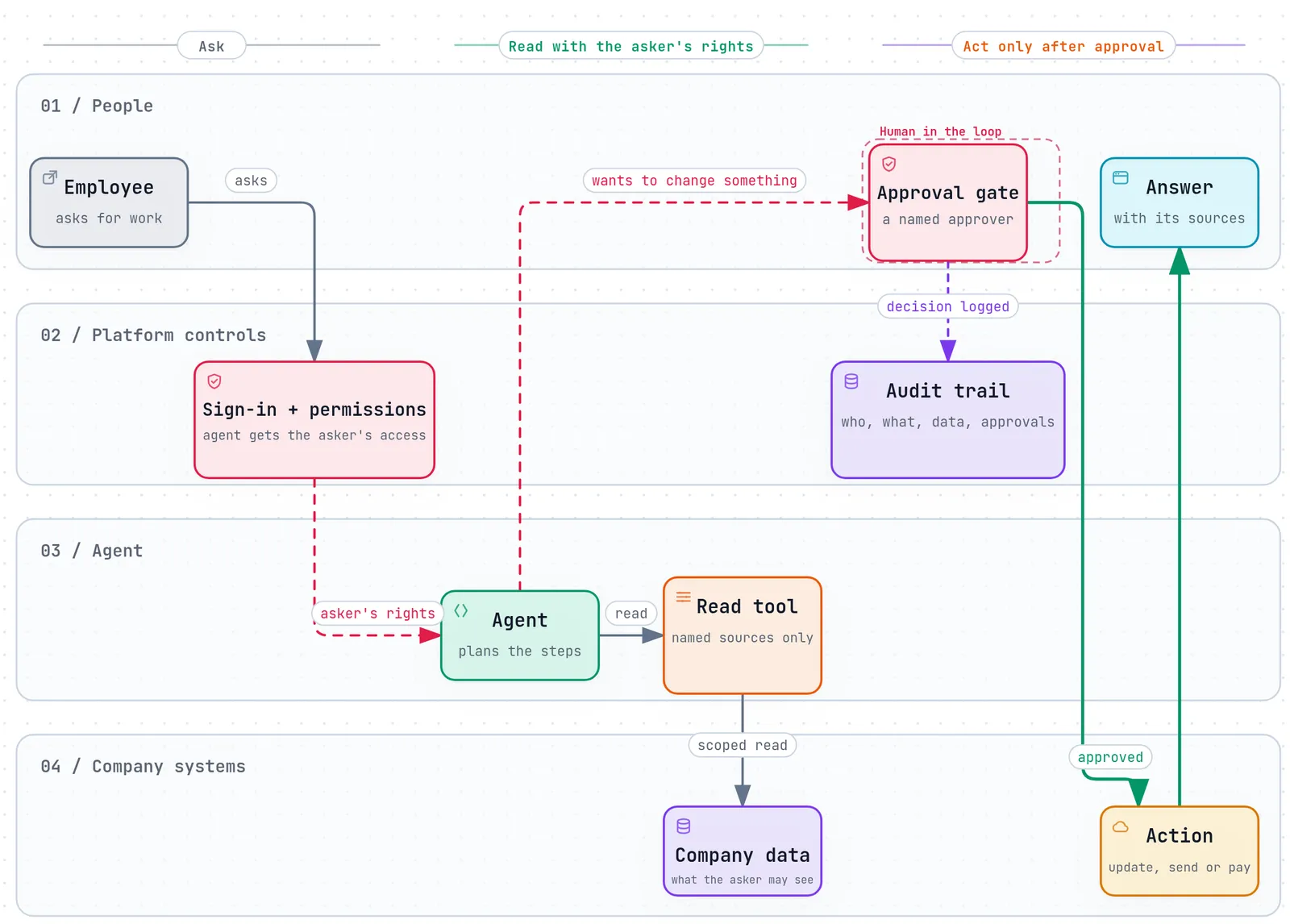
| 2 | Scoped identity | The agent signs in as itself and works with the asking user's permissions, never broader | Access policy and tests |
| 3 | Rule of Two | At most two of untrusted input, private data and outside action in one session | Profile in the register |
| 4 | Approval gates | Tools rated by risk; writes, sends, deletes and payments wait for a named approver | Approval log |
| 5 | Vetted tools | Plugins, connectors and models approved and version-pinned like any dependency | Approved list |
| 6 | Isolated runtime | Separate environments, no public exposure, outbound traffic limited | Architecture diagram |
| 7 | Audit trail | Who asked, which tools ran with which inputs, what data was used, who approved | Export for any run |
| 8 | Memory limits | Retention periods for history and memory; client data never used for training | Retention table |
| 9 | Measured accuracy | A test set of real questions, run before launch and after every change | Test results |
| 10 | Off switch and clean exit | One action disables the agent; retiring it revokes access and deletes memory | Decommission checklist |
How do you stop an agent being turned against you?
Assume that some instructions hidden in a document, web page or email will get through to the model. Prompt injection has no complete fix today, so the safer design limits what a misled agent can do.
Meta's Agents Rule of Two gives a simple test. In one session, an agent may combine at most two of: processing untrusted input, accessing private data, and changing systems or communicating externally. An agent that summarises supplier emails and can also send email and read the HR drive has all three, so each outgoing message needs approval, or the work splits into two sessions with separate permissions. The same idea appears as the "lethal trifecta" in Simon Willison's writing, and as goal hijack and tool misuse in the OWASP Top 10 for Agentic Applications.
The tools themselves are part of the supply chain. Third-party plugins and connectors can carry malicious code, so they deserve the same review and version pinning as open-source packages. Our DevSecOps supply-chain case study shows that discipline applied to a regulated client's build pipeline.
Where should a person stay in the loop?
The guidance asks for human intervention on high-risk, irreversible or unusual operations. Put the approval step on the tool itself, not in the prompt, so the model cannot talk its way past it. Route requests to the channel approvers already watch, such as Teams or email, and show the exact action and inputs.
Approval only works if people read it. Singapore's agentic AI framework warns about automation bias and suggests watching how often, and how quickly, people override an agent. The same measure works for approvals: if an approver accepts every request within seconds, the agent's scope or the approver's workload needs another look.
What evidence should you be able to show?
When the PCPD, an auditor or your own board asks how an agent handles personal data, these documents answer it:
- The register entry, with a privacy impact assessment for each stage from evaluation to uninstall.
- The audit trail for any run, kept outside the agent so it outlives the agent's own logs.
- The approval log, with who approved what and when.
- The retention table, and the steps to find, correct and erase someone's data.
- The wording in your collection statement and privacy policy that discloses agentic processing.
- The decommission checklist for every agent you have retired.
How we build agents at BSOL
We build agents in two ways: as workflows in SmartGEN, our AI platform, or as custom builds that rely on SmartGEN for sign-in, permissions and the audit trail. Either way, the ten controls above are our starting point, and each agent we hand over comes with its register entry and evidence pack. More on this work is on our Data & AI page.
Sources
- Office of the Privacy Commissioner for Personal Data, Protecting Personal Data Privacy in the Use of Agentic AI, 25 August 2026
- Reed Smith, Hong Kong's new guidance on protecting personal data privacy in agentic AI use, September 2026
- Conventus Law, Agents of change: Hong Kong's new data privacy guidance for agentic AI, September 2026
- Mayer Brown, PCPD completes its 2026 AI compliance checks, July 2026
- OWASP GenAI Security Project, Top 10 for Agentic Applications 2026, December 2025 (summary by Giskard)
- Meta, Agents Rule of Two, October 2025; Simon Willison, The lethal trifecta for AI agents, June 2025
- IMDA, Model AI Governance Framework for Agentic AI, version 1.5, June 2026