

Friday morning, a little after nine, in an office in Kwun Tong. A supplier payment is due by noon. The finance manager logs in to the bank, types the amount and waits for the verification code. The code goes to Outlook, and Outlook won't open. IT looks into it: the problem is on Microsoft's side, and nobody can say when it will be fixed. Over in sales, customer orders normally arrive by email, so this morning nobody can see any of them, and someone is asking whether the boss can approve a purchase on WhatsApp instead.
That office is made up. The problems weren't. On 12 and 13 November 2026, Exchange Online was down across Hong Kong for more than a day, and firms told the South China Morning Post about bank transfers they couldn't make and customer updates that never came. Teams and SharePoint mostly kept working. Email, and everything quietly hanging off it, didn't.
Most of a plan for that day costs nothing. It's a handful of decisions made in advance. A few pieces need a second way to reach the same information, one that doesn't depend on the mailbox. That's the part we build at BSOL.
Who decides it's an outage?
Until someone says it out loud, people spend the morning restarting Outlook and emailing IT about the email. Pick that person now, plus a deputy for when they're on leave. The first check takes two minutes on the Service Health page in the Microsoft 365 admin centre. If Microsoft has logged an incident, they tell everyone on the backup channel and say when the next update is coming.
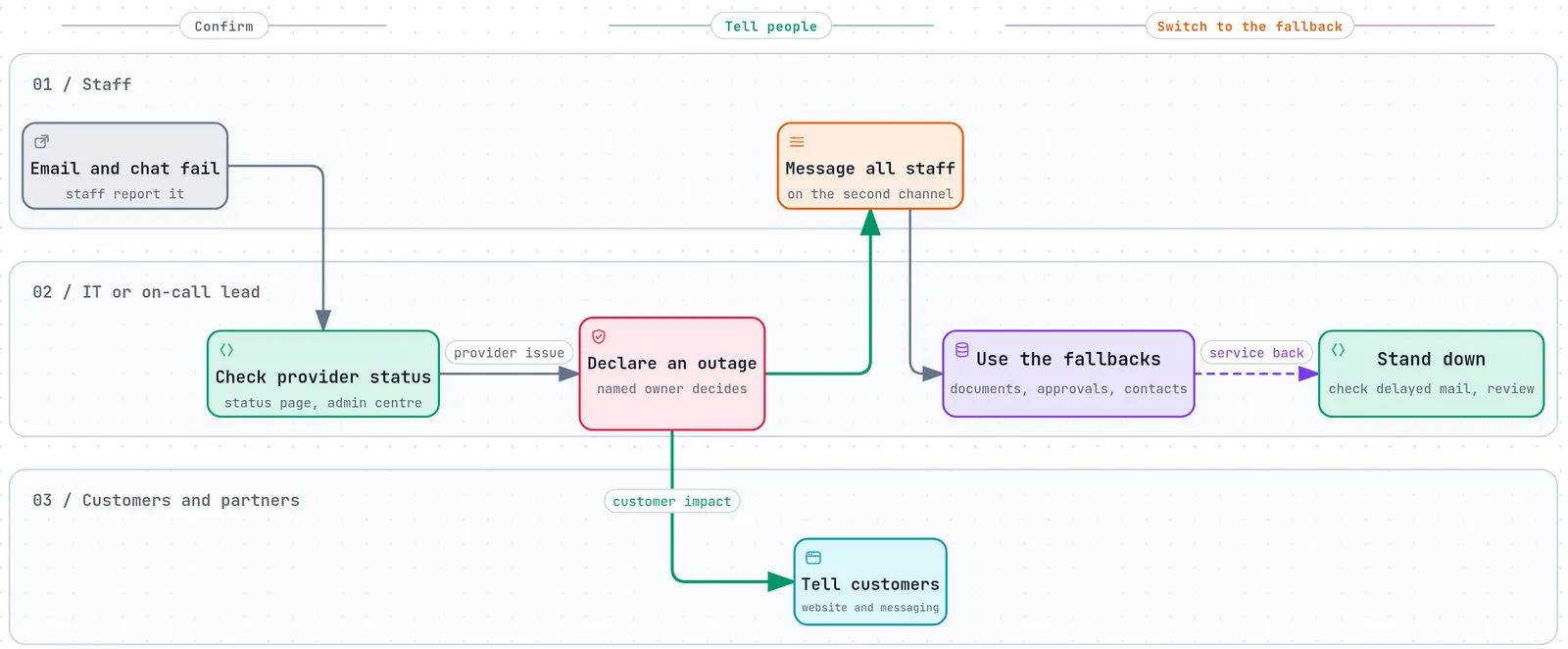
If you already have a way to reach staff during typhoon signal 8 or a black rainstorm, use the same one. And don't stand down the moment Outlook opens again. Microsoft held delayed mail for up to 48 hours this time, so payments and orders can land hours late. Someone should go through them and look for anything that was sent twice by a colleague who gave up waiting.
Where do your bank codes go?
Ask your finance team today. If the one-time codes for your corporate banking go to email, register a second method with the bank, such as SMS, an authenticator app or a hardware token. Do the same for any other service you can't work without. Make sure more than one authorised person holds it, so a holiday doesn't stop payments either.
Keeping customers in the loop
When email is down, customers still message you, mostly on WhatsApp or WeChat. Decide now which channel you'll use, draft a website banner in English and Traditional Chinese, and list a phone number for people who don't use the app.
Use a company business account rather than staff's personal phones. Under the PDPO the company is still responsible for client data in those chats, and when an employee leaves, the history leaves with their phone. Our omnichannel messaging service puts those channels into one managed view, so customers can reach you on more than one channel and staff answer from one place.
Approvals that don't live in an inbox
A continuity plan works when the things you need on a bad day can be reached more than one way. Approvals are usually the first thing to break. If a purchase is approved by replying "OK" to an email, the approval only exists in the mailbox, and nothing gets approved while email is down.
A workflow system keeps the request and the answer in its own records, which people open in a browser or on their phone, and reminds them by more than one route. Email becomes one way of hearing about an approval, not the only place it lives. We make one for this, called Keiroflow, and we set it up around the approval steps your team already follows. For the rare day when even that fails, agree who can approve what by phone, and write it down.
Orders that don't wait for email
Plenty of firms have online orders that reach sales only as an email, or an ERP that mails purchase orders to suppliers. On 13 November all of that sat and waited.
With a direct connection, the order goes straight into the system, where sales can see it on screen, and the email is just a notification. If one side is down, the connection catches up afterwards and books each order once. We build these connections as part of our digital transformation projects.
Documents you can still open
Every plan needs a few documents on a bad day: the plan itself, key contracts, staff and supplier phone numbers, and the steps for paying someone when the usual approver can't be reached. SharePoint can stay their everyday home. Keep a second copy somewhere that doesn't use the same provider or the same Microsoft sign-in, and check that staff can actually open it.
We make a product for this called KumiDocs, a document management system that runs on-premise or with a hosting provider you choose. It has libraries, version history, permissions, full-text search and an audit log.
The one-page checklist
| What | Have this ready | BSOL can help |
|---|---|---|
| Who decides | One person who declares an outage, plus a deputy | |
| First check | Service Health bookmarked, Microsoft support contacts listed | |
| Staff | A backup channel everyone has joined | |
| Bank codes | A second method besides email, held by more than one person | |
| Customers | A business messaging account and a bilingual website banner | ✓ |
| Approvals | Approvals recorded in a workflow, not only in the mailbox, plus who approves by phone | ✓ (Keiroflow) |
| Orders | Orders go straight into the system; email only notifies | ✓ |
| Key documents | A second copy of the plan, contracts, contacts and payment steps, with its own sign-in | ✓ (KumiDocs) |
| Critical systems | A standby copy or second cloud where downtime costs most | ✓ |
| Afterwards | Check late mail, payments and orders for gaps and duplicates |
Print it and keep a copy somewhere other than Microsoft 365. Once a year, spend half an hour switching everyone to the backups. You'll find the phone numbers that are out of date, and any backup that still needs a Microsoft login.
What happens when you call us
Most firms I speak to after a day like 13 November have half the decisions made already. What they're missing is a clear picture of everything that quietly runs through one mailbox, so that's where we start.
First comes an Architecture Review. Our engineers trace which approvals, orders, alerts and documents depend on Microsoft 365, and you get the findings, the risks and a written roadmap, at a fixed scope. It works on a live setup or on a plan you're still drawing up.
Then we build the second routes, in the order the roadmap sets:
- Approvals. We map each process with the people who run it, simplify it with them, and move it into Keiroflow, where everyone can see its status.
- Orders and system messages. We connect your systems with APIs and data flows, and bridge the older ones that have to stay, so an order is entered once and lands where staff can see it.
- Customer channels. We connect WhatsApp, Instagram, WeChat and LINE into one managed conversation layer, linked to your sales and service systems, so each customer keeps one thread whoever replies.
- Key documents. KumiDocs holds the second copy, on-premise or with a hosting provider you choose, behind its own sign-in.
- Critical systems. Some systems can't stop for a day, like a customer portal or a payment flow. We agree how long each can be down and how much data it can lose, then build the standby environment to the same delivery, security and monitoring standard as the main one, so it's ready on the day you switch.
None of this sits idle waiting for the next outage. On an ordinary week it means approvals you can track, data nobody re-keys, and one history for every customer conversation. The continuity comes with it.
If you'd like to go through your list together, book a 20-minute call or request an Architecture Review.
Sources
- Microsoft 365 Service Health, incidents EX1550543 and MO1550821, 12 to 15 November 2026 (as republished by the University of Pennsylvania)
- South China Morning Post, Microsoft Outlook outage puts Hong Kong's financial sector on hold, 13 November 2026
- Dimsum Daily, Hong Kong hit as Microsoft 365 global outage disrupts Outlook, Teams and Copilot, 13 November 2026